Customizable Android control panel with built-in recorder and sliders
Experience a centralized, swipe-accessible control panel that consolidates system toggles, media controls, and utility tools into a single overlay. Smart Control - Quick Settings, from Alfredo Aviles, targets Android users who prefer one-handed device management. The app groups brightness and volume sliders, quick toggles, screen recording, and screenshot tools into adjustable templates and trigger areas. It fits people who value fast access and visual customization for daily phone use.
What does Smart Control actually provide?
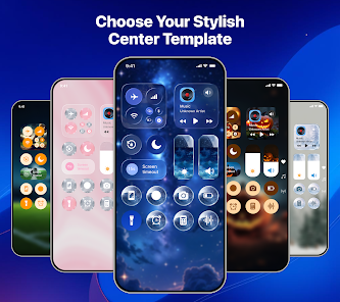
Smart Control places a customizable control panel over the Android interface that exposes common system toggles and utilities without opening Settings. The panel offers dedicated sliders for brightness and volume, quick switches for Do Not Disturb and Airplane Mode, and integrated screen recorder and screenshot tools. Multiple center templates and an adjustable quick control bar let you change button layout, size, and color to match specific workflows.
Does it slow down your device during use?
The app is designed to run as an always-available overlay, so background resource use matters. The source material indicates it targets modern Android devices, implying optimized behavior for current hardware. Because it provides on-screen controls and live sliders, expect continuous small resource consumption while the overlay is active; CPU and memory impact depend on device specifics rather than on the app's feature list alone.
Do I need technical knowledge to set it up and customize it?
Customization uses on-device templates, position settings, and image options for backgrounds such as gallery photos or blur effects, which keeps advanced choices within a visual editor. Adjustable trigger areas are presented as simple position and size controls, so users who can change a few sliders and pick templates can tailor the panel. The app groups functions into templates, reducing the need for deep system knowledge to configure common setups.
Clear fit for hands-on customizers, with a niche user base trade-off
Smart Control suits Android users who prefer configuring a personalized, always-on control surface and those who use screen recording and quick toggles frequently. The main trade-off is its narrower audience compared with long-standing competitors, which may affect how quickly missing features or device-specific quirks get addressed. For people who want a tailored access layer, it provides practical control; those seeking broad community support should consider that limitation.